Latest Sync : Not synced
Calendar
Manage account-based schedules and to-dos in one view.
Jireh-ERP
Settings
Manage accounts, notifications, runtime credentials, sync, and display options.
Account Management
Login PIN
SecurityChange the password used to unlock Jireh-ERP. The new PIN must be at least 8 characters.
Telegram Settings
Runtime Credentials
EncryptedStore actual API keys, bot tokens, chat IDs, and SMTP values used by Jireh-ERP runtime modules. This is separate from the left-menu Credentials vault.
Google Calendar Sync
Not connectedTwo-way sync starts from 2026-05-01 KST. Earlier events are ignored.
Loading...
Archived Projects
Completed Project Management items archived from Project Detail can be restored here.
Quick Links
0Typography
Adjusts all Jireh-ERP text except the left menu bar in 1pt steps.
Utilities Menu Order
Decision Helper Menu Order
To-do
To-do List
Manage tasks without opening the calendar.
Shopping
Shopping List
Keep quick purchase-place lists and send each place to Telegram.
Purchase Places
0 openBag Packing
Bag Packing
Build reusable inventory and send each packing list to Telegram.
Inventory
0Packing Lists
0Bookmarks
Bookmarks
Save favorite websites and keep the list easy to edit.
New Bookmark
New Category
Saved Bookmarks
Gmail
Add one Gmail account at a time, then repeat for each inbox you want to manage.
Memo
Memo
Capture plain-text notes and review them by date.
New Memo
Saved Memos
Personal ERP
Subscriptions
Track recurring payments, renewal dates, and calendar reminders.
New Subscription
Subscription List
*USD 1 = KRW 1,500Auction
Auction
Search auction items by provider and shape the result table for your workflow.
Search Conditions
OnbidSaved Conditions
Auction Items
Personal ERP
Prompt Library
Store reusable prompts by category and browse them in a compact board.
New Prompt
New Category
Saved Prompts
Secure Vault
Credentials
Store API keys, IDs, passwords, chat IDs, and private notes in an encrypted vault.
New Credential
New Category
Saved Credentials
Decision Helper
Dashboard - General
A paginated registry for accumulated general decisions, final choices, outcome grades, and review notes.
Decision Registry
General Decision Dashboard
Decision Helper
General Decision
Guided Canvas + Scoring Matrix
Active Decision
New General Decision
Decision Helper
Investment Decision
Thesis Board + Risk / Reward Matrix
Active Thesis
New Investment Decision
Investment Decisions
Project Management
Project Dashboard
Project Management
Project Detail
Project Management
Manual
Use Project Dashboard for the full portfolio view, then open Project Detail for schedule and task editing.
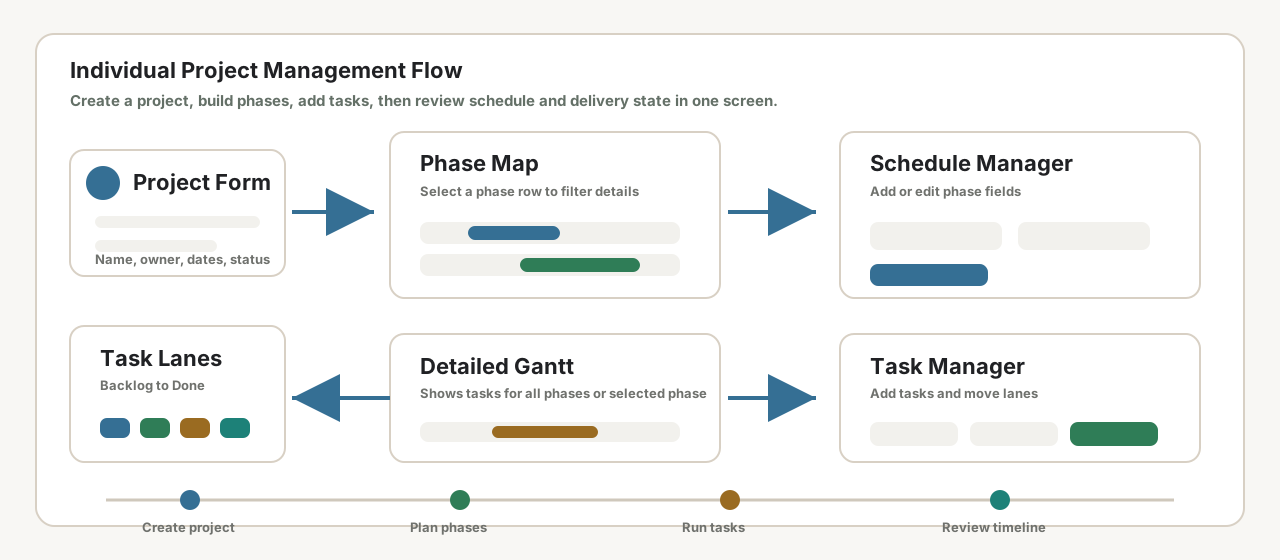
Create the project first. The left Project Management submenu will list that project under Project Detail.
Add phases in Schedule Manager. Selecting a phase filters the Task Arrangement inside Project Detail.
Use Project Dashboard to see every task across Backlog, Planning, Execution, Review, and Done.
Use Project Timeline in Project Dashboard to switch into a specific project detail workflow.
Writing
Essay
If the embedded app is blocked, open it in a new tab.
Finance
PMS
Opens Google Sheets as a maximized separate window.
PMS Google Sheet
The spreadsheet opens in a separate browser window using the maximum available screen size.
If the popup is blocked, use the button above.
Utilities
Youtube Down
Save video files through the local utilities server.